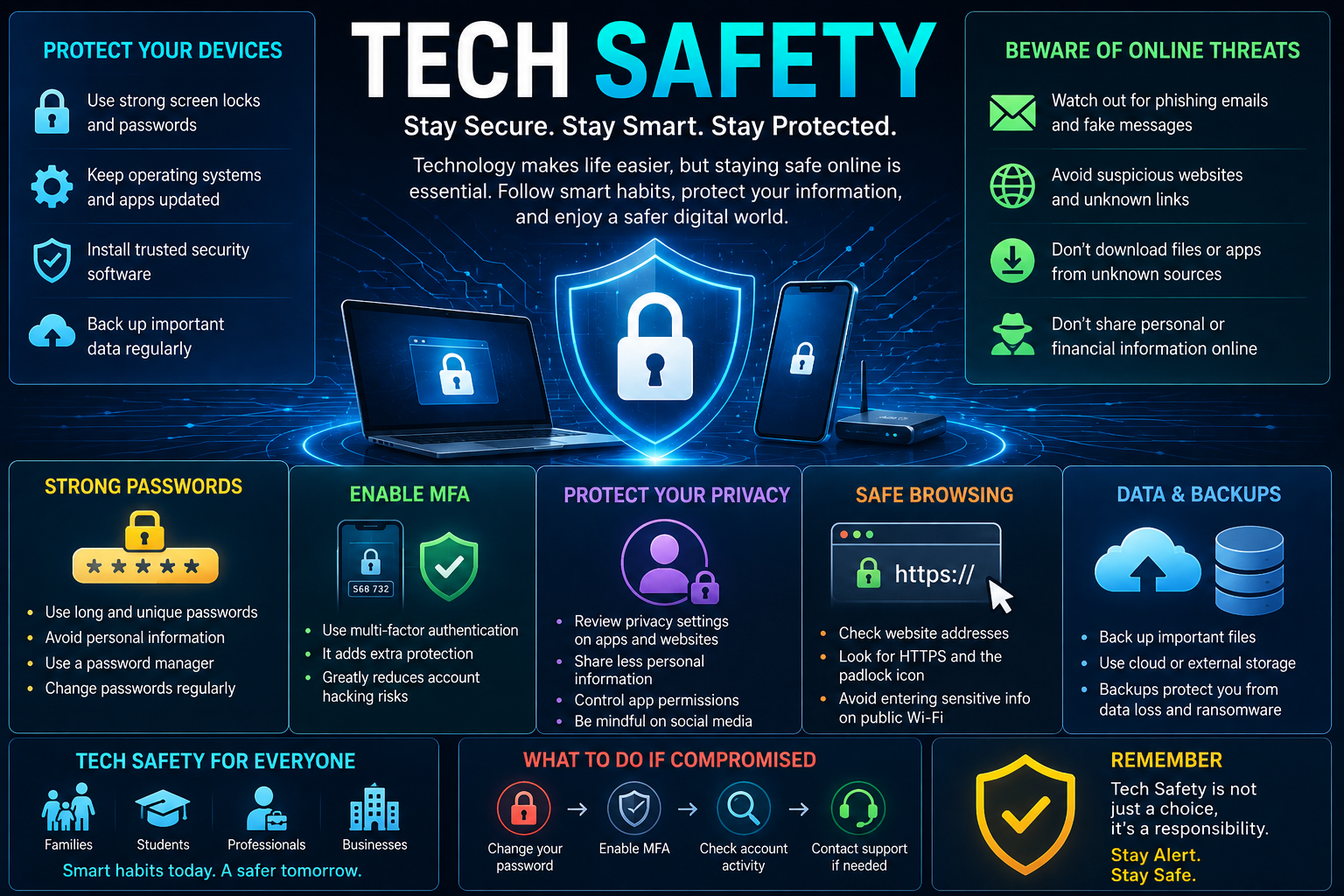
Tech Safety means using technology in a safe and responsible way. It includes protecting phones, computers, accounts, personal information, online identities, and digital activities from common risks. Today, technology is part of almost every area of life. People use smartphones for communication, computers for work, online banking for payments, social media for sharing information, and websites for shopping and learning. Businesses also depend on digital systems for customer information, payments, communication, storage, and daily operations. Because so much information is now digital, Tech Safety has become an important part of everyday life.ai ml technology
Why Tech Safety Is Important
The amount of personal information stored online continues to grow. Names, phone numbers, photographs, financial information, work documents, passwords, conversations, and other personal details may all be connected to digital accounts.
A security problem with one account can sometimes affect other services. For example, if someone uses the same password for email, shopping, and social media, a stolen password could put several accounts at risk.
Tech Safety helps reduce these risks by encouraging users to build strong digital habits.
There are several important reasons to take Tech Safety seriously:
- Personal information needs protection.
- Online accounts can contain valuable information.
- Smartphones can store photographs, messages, contacts, and payment details.
- Businesses hold customer and employee information.
- Cybercriminals use different methods to trick users.
- Fake websites and applications can look real.
- Data breaches can expose personal information.
- Malware can damage or lock files.
- Weak passwords can make accounts easier to access.
- Unsafe online behavior can create privacy problems.
Tech Safety is especially important because many attacks target people rather than technology itself. A criminal may not need to break into a complicated system if they can convince someone to click a fake link or provide a password.
This is why learning basic Tech Safety can be one of the most useful digital skills.
Common Tech Safety Risks
There are many different risks in the digital world. Some are technical, while others depend on human behavior.
Understanding common risks makes it easier to avoid them.
Phishing
Phishing is a common type of online scam. A criminal may send an email, text message, or social media message that appears to come from a trusted organization or person.
The message may ask the user to:
- Click a link
- Enter a password
- Confirm account information
- Download a file
- Make a payment
- Provide a verification code
The goal is often to steal information or install harmful software.
Good Tech Safety means checking messages carefully before taking action.
Malware
Malware is harmful software designed to damage systems, steal information, monitor activity, or perform other unwanted actions.
Malware can enter a device through unsafe downloads, suspicious attachments, fake applications, compromised websites, or other methods.
Keeping software updated and downloading applications from trusted sources can reduce risk.
Weak Passwords
Simple passwords are easier to guess or steal.
Using the same password on many websites is also risky. If one service experiences a data breach, attackers may try the same password on other services.
Strong and unique passwords are an important part of Tech Safety.
Identity Theft
Identity theft occurs when someone uses another person’s personal information without permission.
Stolen information may include:
- Name
- Address
- Phone number
- Account details
- Identification information
- Financial information
- Login credentials
Protecting personal information is therefore an important part of Tech Safety.
Fake Applications
Some harmful applications are designed to look like legitimate apps.
They may request unnecessary permissions or attempt to collect sensitive information.
Users should download applications from trusted sources and review the developer, ratings, permissions, and other available information.
Social Engineering
Social engineering involves manipulating people into providing information or performing an action.
A criminal may pretend to be a bank employee, company representative, friend, family member, or technical support worker.
The person may create urgency and pressure the victim to act quickly.
Tech Safety requires staying calm and verifying unusual requests independently.
Tech Safety for Smartphones
Smartphones contain a large amount of personal information. A modern phone can contain contacts, photographs, messages, email accounts, banking applications, social media accounts, documents, and location information.
This makes smartphone Tech Safety extremely important.
Start with a strong screen lock. A PIN, password, or biometric method can prevent unauthorized access if the phone is lost.
Users should also keep the operating system updated. Updates often include security fixes that protect against known weaknesses.
Applications should be downloaded from trusted stores whenever possible.
It is also useful to review application permissions.
For example, a simple calculator application may not need access to contacts or location information. If an application requests permissions that do not seem necessary, users should think carefully before allowing them.
Other smartphone Tech Safety practices include:
- Use a secure screen lock.
- Keep the operating system updated.
- Update applications regularly.
- Download apps from trusted sources.
- Review app permissions.
- Avoid unknown links.
- Turn on device tracking features.
- Back up important information.
- Avoid sharing unnecessary personal information.
- Remove applications that are no longer needed.
- Be careful when using public Wi-Fi.
- Protect your phone from unauthorized physical access.
A lost phone does not automatically mean a major security problem. Strong device protection, remote tracking, and backups can reduce the potential damage.
Tech Safety for Computers
Computers are used for work, education, entertainment, financial activities, and storing important files.
Basic computer Tech Safety begins with regular updates.
Operating systems, browsers, applications, and security software should be kept updated. Security updates can fix known weaknesses.
Users should also be careful when downloading files. Unknown websites and unofficial software sources can contain harmful programs.
Important computer Tech Safety habits include:
- Use a strong login password.
- Keep the operating system updated.
- Update applications.
- Use trusted security software.
- Enable a firewall when appropriate.
- Download software from trusted sources.
- Avoid suspicious email attachments.
- Back up important files.
- Lock the computer when leaving it unattended.
- Remove software that is no longer needed.
- Use separate accounts when appropriate.
- Avoid using administrator privileges for ordinary activities when practical.
Businesses should take additional steps because company computers may contain customer records, financial information, internal documents, and confidential data.
Password Safety
Passwords remain one of the most important parts of Tech Safety.
A strong password should be difficult for another person to guess. It should also be unique to the account.
Instead of using the same password everywhere, users should use different passwords for important services.
A password manager can help create and store unique passwords.
For important accounts, users should also enable multi-factor authentication.
Good password practices include:
- Use unique passwords for important accounts.
- Avoid simple words and common patterns.
- Do not use easily guessed personal information.
- Avoid sharing passwords.
- Use a password manager when useful.
- Enable multi-factor authentication.
- Change passwords if an account may have been compromised.
- Never provide a password because someone creates pressure or urgency.
A password should be treated as private information. Legitimate organizations generally should not need a user to send their password through an email or message.
Multi-Factor Authentication and Tech Safety
Multi-factor authentication, commonly called MFA, adds another security step to an account.
Instead of relying only on a password, MFA can require another form of verification.
This may include:
- An authentication application
- A security key
- A verification code
- A biometric method
- Another approved authentication method
MFA is useful because a stolen password alone may not be enough to access the account.
For example, if someone obtains a password through phishing, the second authentication factor can provide another layer of protection.
Tech Safety becomes stronger when important accounts such as email, financial services, cloud storage, and business systems use multi-factor authentication.
Email accounts are especially important because they can sometimes be used to reset passwords for other services.
Protecting email should therefore be a high priority.
Tech Safety and Online Privacy
Security and privacy are connected, but they are not exactly the same.
Security focuses on protecting information and systems from unauthorized access.
Privacy focuses on how information is collected, used, stored, shared, and exposed.
Good Tech Safety includes both.
People should think carefully before sharing personal information online.
Information that may seem harmless can sometimes become useful to criminals when combined with other information.
Users should review privacy settings on social media platforms and applications.
It is also important to check what permissions an application has.
Users can ask:
- Does this app really need my location?
- Does this service need access to my contacts?
- Do I need to share my exact birthday?
- Who can see my posts?
- Is my profile information public?
- What information does this service collect?
Reducing unnecessary information sharing can improve privacy.
Tech Safety on Social Media
Social media can connect people, but it can also create privacy and security risks.
Users often share photographs, locations, workplaces, travel plans, family information, and other details.
Criminals can sometimes use publicly available information to create convincing scams.
Social media Tech Safety includes reviewing privacy settings and being careful about accepting unknown people.
Users should be careful with direct messages that contain:
- Urgent requests
- Suspicious links
- Investment offers
- Prize claims
- Requests for passwords
- Requests for verification codes
- Requests for money
- Strange login warnings
Fake profiles can look convincing. A profile photograph or mutual connection does not automatically prove that an account is genuine.
Users should also be careful about posting information that reveals when they are away from home.
Tech Safety and Phishing
Phishing deserves special attention because it is one of the most common ways criminals target users.
A phishing message may look professional and may use familiar company names, logos, or language.
The message may say that:
- Your account will be closed.
- Your payment failed.
- You won a prize.
- Your package cannot be delivered.
- Your account needs verification.
- A suspicious login was detected.
- You need to confirm your identity.
The message is designed to create urgency.
Good Tech Safety means stopping before clicking.
Instead of using a link in a suspicious message, open the official application or type the known website address yourself.
Never provide passwords or verification codes simply because a message asks for them.
If a message claims to come from a bank, company, or service provider, contact the organization through an official channel.
Tech Safety and Public Wi-Fi
Public Wi-Fi can be convenient in airports, hotels, cafes, offices, and other public locations.
However, users should understand that not every public network is trustworthy.
A network name can sometimes be copied or created by someone who wants to attract users.
Good Tech Safety practices include:
- Confirm the network name with staff when possible.
- Avoid connecting automatically to unknown networks.
- Avoid sensitive activities on networks you do not trust.
- Use secure websites and applications.
- Turn off Wi-Fi when it is not needed.
- Keep device software updated.
- Consider using a trusted VPN when appropriate.
Public Wi-Fi does not automatically mean that a network is dangerous, but users should avoid assuming that every network is secure.
Tech Safety for Families and Children
Children increasingly use phones, tablets, computers, games, and online platforms.
Families can improve Tech Safety by teaching children basic digital habits.
Children should understand that not everyone online is who they claim to be.
Parents and guardians can explain:
- Do not share private information with strangers.
- Do not send photographs to unknown people.
- Do not click suspicious links.
- Tell a trusted adult about uncomfortable messages.
- Do not share passwords.
- Be careful when downloading applications.
- Use privacy settings.
- Ask for help when something online seems wrong.
Parental controls can also help families manage age-appropriate content, applications, and screen access.
However, technology controls should be combined with communication and education.
Children need to understand why digital safety matters rather than simply being told what they cannot do.
Tech Safety for Businesses
Businesses face larger technology risks because they may hold information belonging to many people.
A business can lose money, customer trust, and valuable information after a serious security incident.
Business Tech Safety should include clear policies and employee education.
Companies should consider:
- Strong passwords
- Multi-factor authentication
- Access controls
- Regular software updates
- Data backups
- Security monitoring
- Employee training
- Secure email practices
- Device protection
- Network security
- Incident response planning
Employees should also know how to recognize suspicious messages.
Businesses should avoid giving every employee access to every system. Access should be based on job requirements whenever practical.
If one account is compromised, limiting its permissions can reduce the possible damage.
Tech Safety and Data Backups
Backups are an important part of Tech Safety because security is not only about preventing problems.
Sometimes files can be deleted accidentally, devices can fail, or malware can make information inaccessible.
A backup provides another copy of important information.
Important files may include:
- Family photographs
- Business documents
- Financial records
- School work
- Projects
- Customer information
- Important personal documents
Backups can be stored using cloud services, external drives, or other suitable methods.
The backup itself should also be protected.
It is not enough to create a backup once and forget about it. Important backups should be updated and tested to make sure files can actually be restored.
Tech Safety Checklist
The following checklist provides simple actions that individuals and businesses can use to improve everyday protection.
| Tech Safety Area | Recommended Action |
|---|---|
| Passwords | Use strong and unique passwords |
| MFA | Enable multi-factor authentication on important accounts |
| Updates | Keep operating systems and applications updated |
| Privacy | Review privacy settings and permissions |
| Backups | Back up important files regularly |
| Phishing | Check messages and links before clicking |
| Applications | Download software from trusted sources |
| Wi-Fi | Be careful with unknown public networks |
| Social Media | Limit unnecessary personal information |
| Devices | Use screen locks and security features |
| Protect your primary email account | |
| Business Access | Give users only the access they need |
Following these steps does not guarantee complete protection, but it can significantly improve everyday Tech Safety.
What to Do If Your Account Is Compromised
Sometimes security problems happen even when users take precautions.
If you believe an account has been compromised, act quickly.
First, change the password from a trusted device.
If the same password was used on other accounts, change those passwords too.
Enable multi-factor authentication if it was not already enabled.
Check recent account activity for unusual logins or changes.
Look for:
- Unknown devices
- Unknown login locations
- Changed recovery information
- New messages
- Unexpected purchases
- New applications
- Password reset requests
If financial information may have been exposed, contact the relevant financial institution through an official channel.
If an account has been taken over, use the service’s official account recovery process.
Do not trust people who suddenly contact you claiming they can recover your account for a fee. Account recovery scams can create additional problems.
Tech Safety for Online Shopping and Banking
Online shopping and banking require special attention because they involve financial information.
Before entering payment information, users should make sure they are using the correct website or official application.
Be careful with advertisements and messages that lead to unfamiliar websites.
A website that looks professional is not automatically trustworthy.
Tech Safety for online purchases includes:
- Check the website address carefully.
- Use trusted payment methods.
- Avoid unknown sellers.
- Do not share verification codes.
- Monitor account transactions.
- Keep banking applications updated.
- Avoid entering financial information on suspicious websites.
- Save transaction records when appropriate.
- Report unauthorized transactions quickly.
Banks and other financial services may use security alerts, but users should still verify unexpected messages independently.
Tech Safety for Remote Work
Remote work has made digital security important outside traditional offices.
Employees may access company systems from homes, hotels, cafes, or other locations.
A remote worker should protect both personal and business information.
Important practices include:
- Use a secure home network.
- Keep work devices updated.
- Use strong passwords.
- Enable MFA.
- Lock the device when not in use.
- Avoid sharing work devices with unauthorized users.
- Store work files using approved systems.
- Be careful with public Wi-Fi.
- Follow company security policies.
- Report suspicious activity quickly.
Businesses should also make sure remote employees understand security requirements.
Tech Safety and Software Updates
Many users ignore software updates because they can be inconvenient.
However, updates can include important security fixes.
Operating systems, browsers, applications, routers, phones, and other connected devices may receive security updates.
Using old software can leave known weaknesses unprotected.
Automatic updates can be useful when available.
Users should also be careful about fake update messages. Criminals sometimes create pop-ups that claim a device needs an urgent update.
The safest approach is to update software through the official operating system settings or trusted application sources.
Tech Safety and App Permissions
Applications can request access to different parts of a device.
These permissions may include:
- Camera
- Microphone
- Location
- Contacts
- Photos
- Files
- Notifications
Some permissions are necessary for an application’s main function. Others may not be.
Users should review permissions regularly.
If an application does not need a permission, consider disabling it.
Removing unused applications is also a good practice.
The fewer unnecessary applications and permissions a device has, the easier it can be to manage.
Tech Safety and Smart Devices
Smart devices are becoming common in homes and businesses.
Examples include smart cameras, speakers, watches, televisions, lights, thermostats, and other connected devices.
These products can provide convenience, but they also need protection.
Users should:
- Change default passwords.
- Keep device software updated.
- Use secure Wi-Fi.
- Review privacy settings.
- Disable unnecessary features.
- Buy devices from trusted manufacturers.
- Replace devices that no longer receive security updates when appropriate.
Connected devices should not be treated as completely harmless simply because they are household products.
What to Do After Clicking a Suspicious Link
Mistakes happen.
If you accidentally click a suspicious link, do not panic.
The appropriate response depends on what happened.
If you only opened the page and did not enter information, close it and avoid further interaction.
If you entered a password, change that password immediately from a trusted source. If that password was used elsewhere, change it on those services as well.
If you provided financial information, contact the relevant financial institution through its official contact method.
If you downloaded a file or application, do not open it if possible. Use appropriate security software and consider getting professional technical help if the device behaves strangely.
The key lesson is to act quickly instead of ignoring the problem.
Future of Tech Safety
Technology will continue to change, and Tech Safety will need to change with it.
Artificial intelligence is becoming more powerful, and it can be used for both security and cyber attacks.
AI-powered security systems may help identify unusual behavior and detect threats more quickly.
At the same time, criminals may use AI to create more convincing scams and phishing messages.
Other future areas of Tech Safety may include:
- Passwordless authentication
- Biometric security
- AI-powered threat detection
- Stronger privacy tools
- Secure smart devices
- Better identity protection
- Advanced fraud detection
- Security for AI systems
- Improved digital education
As technology becomes more connected, users will need stronger awareness.
Tech Safety and Artificial Intelligence
Artificial intelligence adds another layer to digital safety.
People may use AI tools to create documents, analyze information, write code, and perform many other tasks.
However, users should be careful about the information they provide to AI systems.
Before entering sensitive information into an AI service, users should understand the service’s privacy practices and applicable organizational rules.
Businesses should establish clear policies for AI use.
Employees may need guidance about:
- Confidential company information
- Customer data
- Personal information
- Passwords
- Financial records
- Internal documents
- Intellectual property
AI can be useful, but responsible data handling remains essential.
Developing Better Tech Safety Habits
Technology safety is not a single action that can be completed once.
It is a habit.
A person can start with a few simple changes and gradually improve their digital protection.
For example, start by securing the primary email account. Then enable MFA on important services. After that, review social media privacy settings and application permissions.
Regularly check for software updates and make sure important files are backed up.
It is also useful to stay informed about common scams.
People do not need to know every technical detail about cybersecurity. They need to develop the habit of stopping and thinking before taking risky digital actions.
A simple question can prevent many problems:
“Do I know exactly who is asking me to do this, and why?”
If the answer is unclear, verify the request before continuing.
FAQs
What is Tech Safety?
Tech Safety is the practice of using digital devices, applications, websites, accounts, and online services safely. It includes protecting personal information, devices, passwords, privacy, and digital accounts.
Why is Tech Safety important?
Tech Safety is important because people store and share large amounts of personal and financial information online. Good safety habits can reduce the risk of scams, unauthorized access, malware, data loss, and privacy problems.
How can I improve Tech Safety on my phone?
Use a strong screen lock, keep the operating system updated, download trusted applications, review app permissions, avoid suspicious links, use device tracking, and back up important information.
What is the most important password rule?
Use strong and unique passwords for important accounts. Avoid using one password across multiple services.
Should I use multi-factor authentication?
Yes. Multi-factor authentication can provide an additional layer of protection beyond a password, especially for important accounts.
How can I recognize phishing?
Look for unexpected messages, urgent requests, suspicious links, strange sender addresses, requests for passwords or verification codes, and offers that seem too good to be true.
Is public Wi-Fi safe?
Public Wi-Fi can be useful, but users should be careful with unknown networks and avoid sensitive activities when they do not trust the connection.
What should I do if my account is hacked?
Change the password, enable MFA, check account activity, secure other accounts that used the same password, and use the service’s official recovery process.
How can parents improve Tech Safety for children?
Parents can use appropriate device controls, review privacy settings, teach children not to share private information, and encourage children to report suspicious or uncomfortable online interactions.
How can businesses improve Tech Safety?
Businesses should use strong access controls, MFA, secure passwords, software updates, backups, employee training, security policies, and appropriate monitoring.
Conclusion
Tech Safety is an important part of modern digital life. People use technology for communication, banking, shopping, education, work, entertainment, transportation, and many other activities. As technology becomes more connected, protecting digital information becomes increasingly important. Good Tech Safety does not require complicated technical knowledge. Strong passwords, multi-factor authentication, regular updates, secure backups, careful browsing, privacy awareness, and caution around suspicious messages can provide a strong foundation. People should also understand that technology safety is not only about computers. Smartphones, tablets, smart televisions, watches, cameras, home devices, applications, social networks, and online accounts all need attention.